
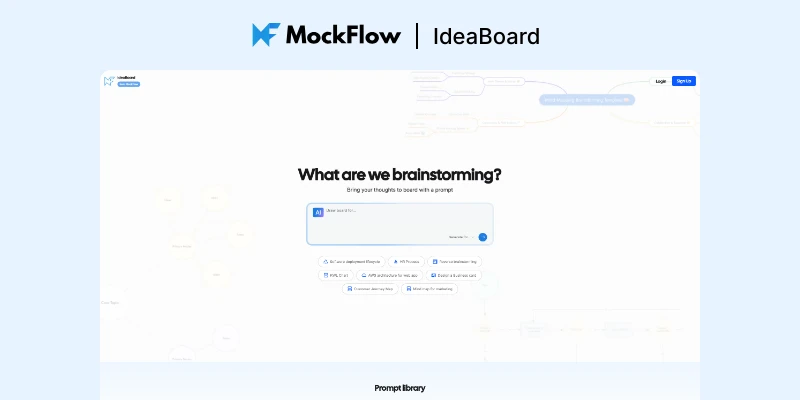
Ideaboard by MockFlow
IdeaBoard - 通过快速提示将您的想法转化为可视化图像
Ideaboard by MockFlow: The AI-Powered Whiteboard That Thinks With You
In today's fast-paced digital landscape, turning abstract ideas into actionable visuals has never been more critical. Enter Ideaboard by MockFlow – a revolutionary AI-powered whiteboard platform that transforms the way teams brainstorm, visualize, and collaborate. If you've ever struggled to articulate a complex concept or found yourself stuck staring at a blank canvas, Ideaboard might just be the solution you've been waiting for.
What Makes Ideaboard Stand Out?
At its core, Ideaboard is an intelligent whiteboard that goes far beyond simple drawing and sticky notes. Its standout feature is MIDA, an AI design partner that actively participates in your brainstorming process. Unlike traditional whiteboards that serve as passive surfaces, Ideaboard actively generates, modifies, and transforms content based on your prompts. This means you can describe a customer journey, system architecture, or marketing strategy in plain English, and watch as the AI creates structured diagrams, flowcharts, and frameworks instantly.
The Three Pillars of AI-Powered Innovation
Generate: From a single text prompt, Ideaboard can create architecture diagrams, UML charts, structured documents, tables, analytics views, mindmaps, and strategic frameworks. What would typically take hours of manual work can now be accomplished in seconds.
Modify: The AI doesn't just create – it iterates. Ask MIDA to reorganize your flowchart, expand a mindmap branch, adjust the hierarchy of a journey map, or enrich existing content. Your work evolves continuously without the need to start from scratch.
Transform: One of the most powerful features is the ability to shift seamlessly between visual formats. Convert brainstorming notes into a mindmap, refine it into a customer journey map, and then transform it into a polished document – all through conversational commands. Structure follows your thinking, not the other way around.
A Universe of Possibilities: Board Types and Use Cases
Ideaboard offers an impressive array of board types, each designed for specific visualization needs:
- Flowcharts & Diagrams: Perfect for mapping processes, workflows, and system interactions
- Mindmaps: Ideal for brainstorming sessions and exploring hierarchical relationships
- AWS & Azure Architecture Diagrams: Essential for cloud infrastructure planning and documentation
- Kanban Boards: Streamline project management and task tracking
- Customer Journey Maps: Understand and optimize user experiences
- Storyboards: Visualize narratives, user flows, and campaign concepts
- Moodboards: Curate visual inspiration for design projects
- Polls & Calendars: Facilitate team decision-making and scheduling
- Swimlane & Sequence Diagrams: Detail complex cross-functional processes
- Database Diagrams: Plan and communicate database structures
Built for Every Team, Every Workflow
One of Ideaboard's greatest strengths is its versatility across different disciplines and team roles.
For Developers: Architecture diagrams, system design visualization, database schemas, and technical documentation become effortless. The AI understands technical concepts and generates accurate technical diagrams from descriptions.
For Designers: Moodboards, design briefs, creative concepts, and design system planning. Bring visual references, brand assets, and inspiration directly onto the canvas without switching between tools.
For Product Managers: Roadmaps, strategy frameworks (like Kano Model and SWOT Analysis), product launch plans, and conversion funnels. Transform vague product ideas into structured, actionable strategies.
For Marketers: Campaign planning, market research, advertising briefs, and brand strategy documents. Visualize marketing funnels, customer segments, and go-to-market strategies collaboratively.
For Researchers: Strategic frameworks, data visualization, competitive analysis, and research synthesis. Apply frameworks like Porter's Five Forces or conduct cause-and-effect analysis with AI assistance.
Collaboration That Actually Works
Ideaboard shines brightest when teams come together. The platform offers real-time co-editing, so you can watch ideas form as team members' cursors move across the canvas. The built-in presentation mode allows you to walk through concepts seamlessly, while integrated chat and video meetings mean you don't need to switch tabs to communicate.
Voice and video comments add another layer of richness – sometimes typing isn't enough to convey nuanced feedback. And for quick consensus-building, emoji reactions let team members vote on ideas or flag concerns without cluttering the board with comments.
Zero Learning Curve, Infinite Possibilities
Despite its powerful capabilities, Ideaboard maintains an intuitive interface that anyone can use from day one. The drag-and-drop functionality feels as natural as a physical whiteboard, and the AI assistant doesn't require special training – you simply describe what you want, and MIDA makes it happen.
The platform also features an extensive template library, covering everything from interior design briefs to product ecosystem maps, from class notes to Fibonacci scale agile planning. These templates serve as starting points that can be customized endlessly to fit your specific needs.
The Chrome Extension: Webpages to Visual Boards
One particularly innovative feature is the Chrome extension that transforms any webpage into a visual, actionable board. The AI reads the content, extracts key information, and builds a structured board automatically. This is invaluable for research, competitive analysis, or quickly capturing inspiration from the web.
How Ideaboard Compares to Similar Tools
The whiteboard and collaboration space is crowded with competitors like Miro, Mural, FigJam, and Microsoft Whiteboard. So what sets Ideaboard apart?
Unlike Miro and Mural, which focus heavily on free-form sketching and basic collaboration, Ideaboard places AI at the center of the experience. While other tools are integrating AI features, Ideaboard was designed from the ground up as an AI-first platform.
Compared to FigJam, which excels in design-specific workflows and integrates tightly with Figma, Ideaboard offers broader applicability across different disciplines – it's as useful for developers planning architecture as it is for designers creating moodboards.
Microsoft Whiteboard, while free and integrated into the Microsoft ecosystem, lacks the advanced AI capabilities and specialized diagram types that make Ideaboard so powerful for serious brainstorming and strategy work.
Perhaps the most significant differentiator is Ideaboard's emphasis on structured output. While traditional whiteboards excel at free-form ideation, they often require significant manual work to transform scattered sticky notes into organized, actionable deliverables. Ideaboard's AI bridges this gap, helping teams move from chaos to clarity seamlessly.
Extensive Ecosystem and Integrations
MockFlow understands that modern teams work across multiple platforms. Ideaboard integrates with an impressive array of tools including Google Workspace, Slack, Microsoft Teams, Trello, Jira, Confluence, Figma, ChatGPT, Claude, and many more. This means you can incorporate Ideaboard into your existing workflow rather than forcing your team to adapt to a new way of working.
Desktop applications for both Mac and Windows enable offline work, ensuring you can brainstorm anywhere, anytime. Mobile support further enhances accessibility, letting you capture ideas on the go.
Pricing and Accessibility
MockFlow offers a free tier that makes it easy to try IdeaBoard without commitment. Paid plans unlock advanced features, unlimited boards, and additional AI capabilities. Given the significant time savings and productivity gains, most teams find that the investment pays for itself quickly through more efficient brainstorming sessions and faster decision-making.
The Bottom Line
Ideaboard by MockFlow represents a significant evolution in collaborative thinking tools. By combining the familiarity of a whiteboard with the intelligence of an AI assistant, it addresses a common pain point: the difficulty of transforming abstract ideas into structured, actionable visualizations.
Whether you're a developer planning system architecture, a designer curating moodboards, a product manager mapping strategy, or a marketer planning campaigns, IdeaBoard offers a versatile, powerful platform that adapts to your needs. The zero learning curve means immediate productivity, while the AI capabilities unlock new levels of creativity and efficiency.
If your team spends significant time in brainstorming sessions, strategy workshops, or collaborative design work, Ideaboard deserves serious consideration. It's not just a whiteboard – it's a thinking partner that helps teams move from ideas to action faster than ever before.
The future of collaborative thinking isn't about drawing better – it's about thinking better together. And Ideaboard is leading the way.