
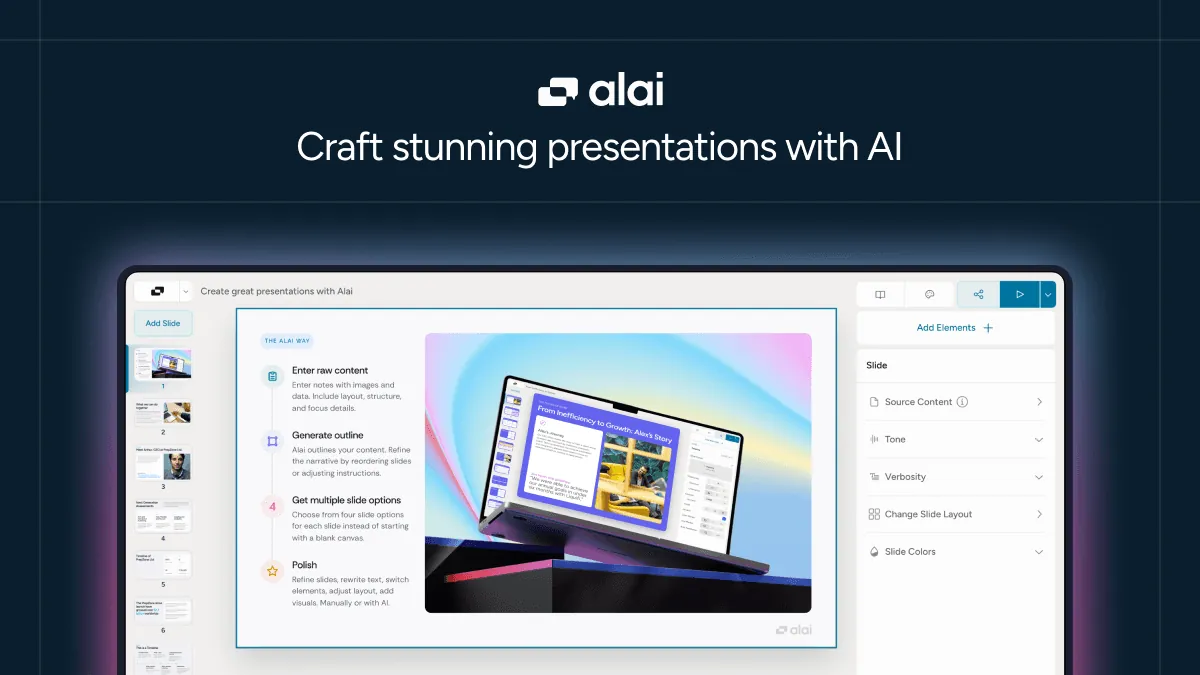
Create Stunning Presentations with AI
使用 Alai 的 AI 演示文稿制作工具即时设计和优化精美的演示文稿。免费开始,在几秒钟内将您的想法转化为专业的幻灯片。
Create Stunning Presentations with AI: A Deep Dive into Alai
In today's fast-paced digital landscape, the ability to create compelling presentations quickly is more crucial than ever. Whether you're pitching to investors, teaching a class, or presenting project updates to stakeholders, professional slides can make or break your message. Enter Alai – an AI-powered presentation maker that's transforming how we approach slide design and content creation.
Introduction: The Presentation Problem Solved
We've all been there – staring at a blank canvas in PowerPoint or Google Slides, struggling with layout decisions, wrestling with font choices, and spending hours perfecting slides that should have taken minutes. Traditional presentation tools require significant design skills and time investment, creating a barrier for professionals who need to focus on content rather than aesthetics.
Alai addresses this pain point head-on by leveraging artificial intelligence to handle the heavy lifting of presentation creation. Founded by Krishna Gupta and Anmol Sood, Alai has quickly gained traction among teams and startups worldwide, offering a solution that promises to turn your ideas into professional decks in seconds rather than hours.
Key Features and Capabilities
1. AI-Powered Composition Engine
At the heart of Alai's offering is its sophisticated AI presentation engine. The Compose feature allows you to "never start from scratch again." Simply input your ideas, topics, or bullet points, and Alai's AI generates a complete first draft with appropriate content structure and flow. This isn't just random text generation – the AI understands presentation dynamics, creating coherent narratives with logical progression between slides.
2. Intelligent Design System
One of Alai's standout capabilities is its Design feature, which delivers "pixel-perfect layouts, colors & typography that adapt to your slides." The system automatically selects and applies professional design elements that complement your content, eliminating the need for manual design adjustments. The AI understands design principles such as visual hierarchy, color harmony, and typographic balance, ensuring your slides look polished without requiring any design expertise.
3. Comprehensive Refinement Tools
The Refine capability sets Alai apart from other AI presentation tools. Users can edit everything – content, tone, verbosity, and layout – anytime, easily. This granular control means you're not stuck with the AI's first attempt. You can adjust the writing style to be more formal or casual, expand or contract content length, and modify layouts to suit specific preferences. The refinement process is intuitive and gives users confidence in the final output.
4. Speed and Efficiency
Perhaps the most compelling feature is the speed at which Alai operates. The platform delivers complete presentations in seconds, dramatically reducing the time investment typically required for slide creation. This efficiency is particularly valuable for professionals working under tight deadlines or those who need to generate multiple variations of presentations for different audiences.
5. Unlimited Creation Potential
With Alai, you can create unlimited AI presentations (depending on your plan), removing the creative bottlenecks that often accompany presentation development. This freedom encourages experimentation and iteration, allowing users to explore different approaches to presenting their ideas without the fear of wasted effort.
Use Cases and Benefits
For Startups and Entrepreneurs
Startup founders often need to create numerous pitch decks for investors, partners, and customers. Alai's ability to quickly generate professional presentations saves precious time that can be better spent on business development. The AI's understanding of business messaging helps create compelling narratives that resonate with different stakeholders.
For Educators and Trainers
Teachers and corporate trainers frequently need to create educational content on various topics. Alai can transform outlines or notes into complete slide decks with appropriate visual organization, making lesson planning significantly more efficient. The ability to adjust tone and verbosity ensures content matches the target audience's comprehension level.
For Business Professionals
Marketing professionals, project managers, and consultants regularly prepare presentations for clients, executives, and teams. Alai streamlines this process, allowing professionals to focus on message strategy while the AI handles design and content structure. The result is more consistent branding across presentations and reduced preparation time.
For Creative Professionals
Even designers and creative directors can benefit from Alai as a brainstorming and prototyping tool. The AI can generate multiple layout options and content approaches that serve as starting points for further refinement, potentially sparking creative directions that might not have been considered otherwise.
How Alai Compares to Similar Tools
Versus Traditional Presentation Software
Unlike PowerPoint, Keynote, or Google Slides, which provide blank canvases and require significant design skills, Alai offers intelligent generation and refinement capabilities. Traditional tools are excellent for manual creation but lack the AI-powered automation that makes Alai so efficient.
Versus Other AI Presentation Tools
The AI presentation space is growing, with tools like Beautiful.ai, Tome, and Gamma offering similar capabilities. However, Alai distinguishes itself through:
- Superior Refinement Controls: While many AI presentation tools generate good first drafts, Alai's granular refinement capabilities allow for more precise adjustments to content and layout.
- Adaptive Design Intelligence: The platform's ability to automatically adapt colors, typography, and layouts to content needs appears more sophisticated than many competitors.
- User-Friendly Interface: Based on user feedback, Alai strikes a better balance between automation and user control, making it accessible to less tech-savvy users while offering advanced features for power users.
- Flexible Pricing Structure: With four pricing tiers (Free, Plus, Pro, and Ultra), Alai offers options for various use cases and budgets, with annual billing providing 20% savings.
Versus Design Collaboration Tools
While tools like Figma and Canva excel at collaborative design and template-based creation, they still require significant manual input. Alai's AI-first approach reduces the need for design templates and manual content creation, though it may not offer the same level of real-time collaboration that these specialized design platforms provide.
Pricing and Accessibility
Alai offers a tiered pricing structure designed to accommodate different user needs:
- Free Plan ($0): Perfect for trying out the platform and creating basic presentations. This plan likely includes limitations on features or output quality.
- Plus Plan ($20/month): Designed for individual users who need more advanced features and higher quality outputs.
- Pro Plan ($30/month): Aimed at professionals who require unlimited presentations and premium features.
- Ultra Plan ($80/month): Likely offers the most comprehensive feature set, potentially including team collaboration tools, priority support, and advanced customization options.
The platform also offers a 20% discount with annual billing, making it more economical for committed users. Additionally, paid plans include features such as unlimited AI presentations, watermark removal, and access to premium features that enhance the overall user experience.
Conclusion and Recommendation
Alai represents a significant advancement in AI-powered content creation tools. By combining intelligent content generation, sophisticated design automation, and comprehensive refinement controls, it addresses the real pain points that professionals face when creating presentations.
The platform is particularly well-suited for:
- Entrepreneurs and startup founders who need to create compelling pitch decks quickly
- Educators and trainers who want to streamline lesson preparation
- Business professionals who need to maintain consistent branding across presentations
- Anyone who wants to create professional slides without investing significant time in design skills
Who Should Use Alai
If you find yourself regularly creating presentations and value efficiency without sacrificing quality, Alai is worth serious consideration. The free plan provides an excellent opportunity to test the platform's capabilities before committing to a paid subscription.
Who Might Want to Look Elsewhere
Users who require highly specialized design control, extensive real-time collaboration features, or prefer a template-based approach might find other platforms more suitable. Additionally, organizations with strict brand guidelines may need to verify that Alai's design outputs align with their specific requirements.
Final Verdict
Alai delivers on its promise of creating stunning presentations with AI. The combination of speed, quality, and user control makes it a valuable tool in any professional's arsenal. As AI technology continues to evolve, platforms like Alai are setting the standard for how content creation tools should function – automating the tedious aspects while empowering users to focus on what matters most: their message and ideas.
For tech-savvy professionals looking to streamline their presentation workflow and embrace AI-powered productivity, Alai represents a smart investment that pays dividends in time saved and quality achieved. The future of presentation creation is here, and it's powered by intelligent automation rather than manual effort.